PromoBar – Customizable announcement banner for PrestaShop
PromoBar is a PrestaShop module designed to display an elegant and effective announcement banner at the top of your store. Communicate your promotions, events, and key information with a clean, multilingual, customizable display that follows accessibility best practices.
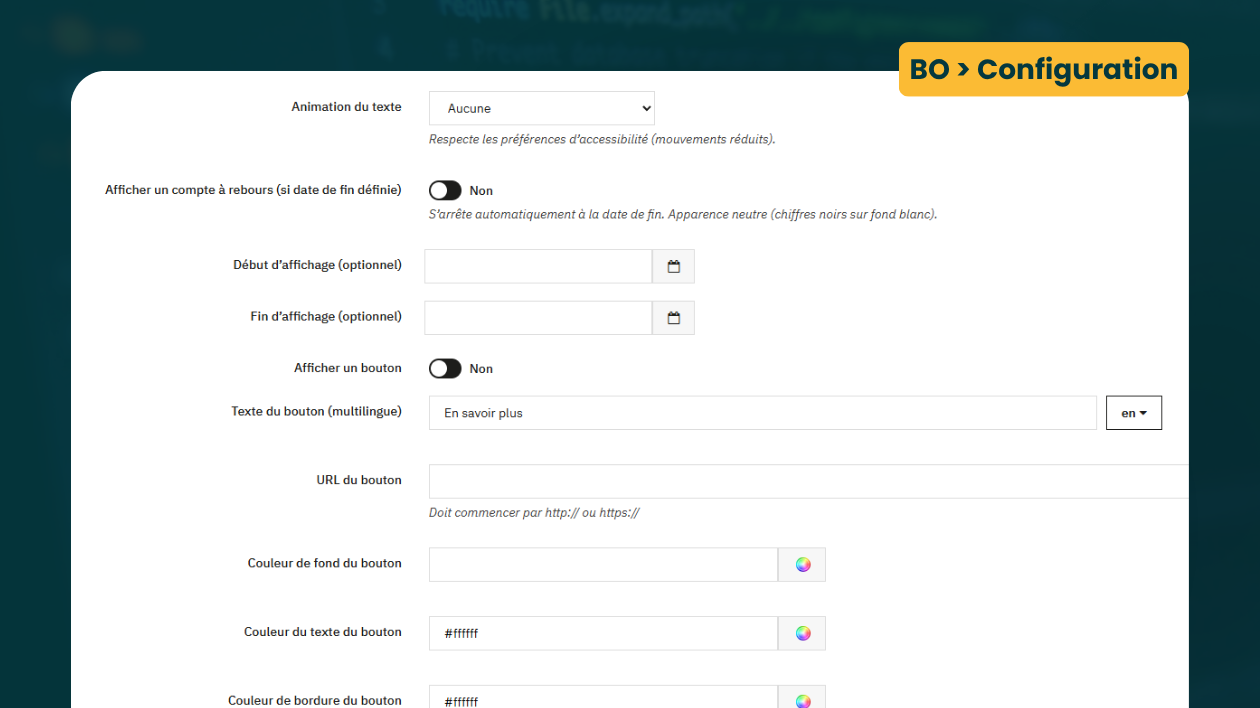
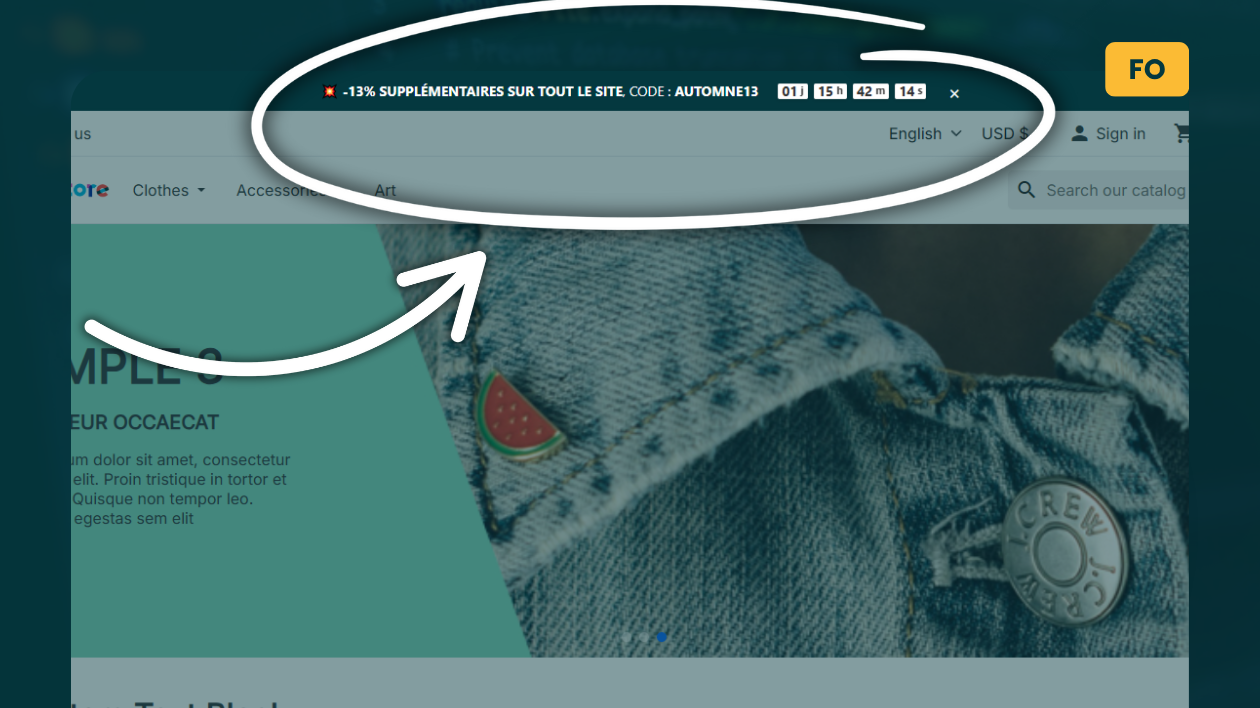
From the back office, enable/disable the banner, choose its position, schedule the display period (start/end date), customize colors and font, add a countdown (if an end date is set), and add a call-to-action button leading to the page of your choice. All without external dependencies, for a lightweight, secure, and high-performance integration.
Why choose PromoBar?
In e-commerce, visibility matters. A clear and discreet announcement banner improves the discovery of your offers without interrupting navigation (unlike intrusive popups). PromoBar draws attention at the right time and stays aligned with your brand: concise message, controlled visual options, and a “close” button to avoid over-soliciting your visitors.
Key features
- Enable / disable the banner from the back office.
- Display position: after the opening of
displayTop.
- Multilingual message with safe mini-markup:
**bold**, [texte](https://url), line breaks, URL autolinking.
- Scheduling by dates: start and/or end date (optional).
- Countdown (optional) — activates if an end date is set, stops automatically at the deadline.
- Call-to-action button: can be enabled, multilingual text, URL (http/https), colors (background, text, border).
- “Close” button with configurable cookie duration: 1, 3, 7, 15, 30, 90, 365 days.
- Visual customization: background color, text color, font via local whitelist (no external resources).
- Text animations: None, Horizontal scrolling (marquee), Soft pulse, Light blink.
- Accessibility: respects the system preference “reduced motion”.
- No external dependencies (bundled JS/CSS, no externally loaded fonts).
Compatibility
- PrestaShop 1.7.x → 9.x
- Modern themes (non-intrusive integration, standard hooks)
- Compatible with Creative Elements (Elementor for PrestaShop)
- PHP: tested from 7.4 to 8.3
Note: the module adds no external dependencies and integrates into the provided hooks without modifying the theme.
Customization & appearance
- Colors: banner background and text + button styles (background, text, border).
- Font: selection from a local whitelist. No external fonts are loaded.
- Animations:
- None (static)
- Horizontal scrolling (marquee-type)
- Soft pulse
- Light blink
- Accessibility: if the user has enabled “reduce motion,” PromoBar automatically reduces effects.
Message & mini-markup
The message content supports a secure mini-markup for an expressive and accessible rendering:
**bold** → bold[texte](https://your-url) → clickable link
The output is server-side sanitized to prevent any injection and to produce only minimal, safe HTML.
Dates & countdown
- Start date (optional): the banner is displayed from this date.
- End date (optional): automatic stop at the deadline.
- Countdown: displays a simple, readable timer when the end date is set.
“Close” button and cookie duration
For a more comfortable experience, the user can hide the banner via a “close” button. The retention duration is adjustable:
- 1 day
- 3 days
- 7 days
- 15 days
- 30 days
- 90 days
- 365 days
Installation
- Download the
promobar.zip file.
- In your PrestaShop back office: Modules > Module Manager > Upload a module, then import the ZIP.
- Install the module and open the “PromoBar” configuration page.
Important: the root folder in the ZIP must be called promobar/, consistent with the module’s technical name ($this->name='promobar').
Configuration (step by step)
- Enable the banner and choose the position (after
displayTop).
- Enter the multilingual message (bold, links, line breaks supported).
- Set the dates: start (optional) and end (optional). Enable the countdown if desired.
- Style: banner and text colors, font (whitelist), text animation.
- Call-to-action button: enable, enter the text (multilingual), the URL (http/https), and customize its colors.
- “Close” button: enable and set the cookie duration (1 → 365 days).
- Save. The banner is ready.
Security & performance
- No external resources: no remote scripts or fonts (better privacy, stability, and speed).
- Server-side sanitization of the message → minimal HTML, reduced injection risks.
- Compact CSS/JS, loaded only for the component.
Use cases
- Promotions: sales, flash deals, promo code.
- Seasonal campaigns: holidays, Black Friday, back-to-school, etc.
- Logistics info: shipping times, exceptional closure, carrier change.
- Product launch: “New release available,” redirect to the product page.
- Reassurance message: free delivery, returns within X days, hotline, etc.
Content best practices
- Clarity: one idea per message.
- Readability: short sentence, keywords in bold.
- Action: button with a verb (“Discover,” “Take advantage,” “Learn more”).
- Timing: end date + countdown to mark the deadline.
- Accessibility: light animations + respect user preferences.
FAQ
Does the banner appear on all pages?
Yes, the banner integrates via the theme hooks and remains globally visible according to the chosen position.
Does the countdown work without an end date?
No. The countdown activates only if an end date is set and stops automatically at the deadline.
Can I disable animations?
Yes, select “None.” The module also respects the system “reduced motion” preference.
Can the button be multilingual?
Yes, the button text is multilingual and the URL can be customized (http/https).
Does the module load external fonts?
No. PromoBar uses a local font whitelist and imports no external resources.
Changelog
v1.0.0 — First stable release
- Display of a configurable announcement banner (multilingual message, secure mini-markup).
- Scheduling by dates (start/end) + optional countdown.
- Visual customization: colors, font (whitelist), light animations.
- Call-to-action button: multilingual text, http/https URL, button colors.
- “Close” button with cookie duration (1 → 365 days).
- Hooks: after (recommended) and displayTop.
- Lightweight integration, no external dependencies, accessibility-friendly.
License
Distributed under the MIT license: use, modification, and redistribution allowed with attribution preserved.
Author & support
BeDOM – Web Solutions
Website: https://bedom.fr/en/
Support: https://bedom.fr/en/support?rewrite=support
LinkedIn: BeDOM – LinkedIn
Facebook: agencebedom
Instagram: @bedom_web
Give your messages visibility without weighing down the experience. Install PromoBar, configure your first banner in a few clicks, and highlight what matters most on your PrestaShop store.